inspector for Tessel

A Tessel library

Property panels for Tessel apps.

The two columns of labels and values beside a drawing or a model, as in CAD and design programs. Number rows take sums and units, rows sit in sections with a search box, and a selection shows Mixed where its things differ.

tessel add inspector

MIT licence · Tessel 0.10 or later · no dependencies

An app with two panels: rows for a beam on the left, and an Inspector for selected shapes on the right, with Mixed values

What it does

Every picture here is the example app that comes with the library, run by Tessel without a window and saved.

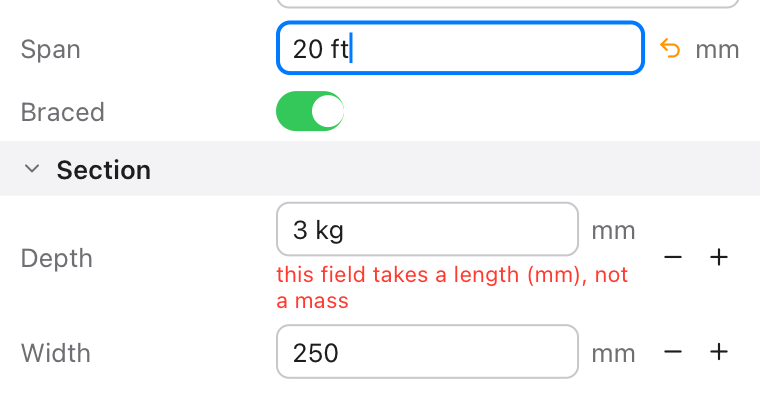
A Span field with 20 ft typed in it and an orange arrow showing it isn't applied yet, and a Depth field with 3 kg and a red message: this field takes a length (mm), not a mass

Sums and units in number fields

Type 20 ft in a field in mm, or 6 m + 250, and Enter gives 6096 or 6250. A unit that doesn't fit is a message, not a wrong number. The arrow shows what's typed but not applied yet.

inspector.NumberRow("Span", value: beam.span, unit: "mm", decimals: 0, min: 0.0)
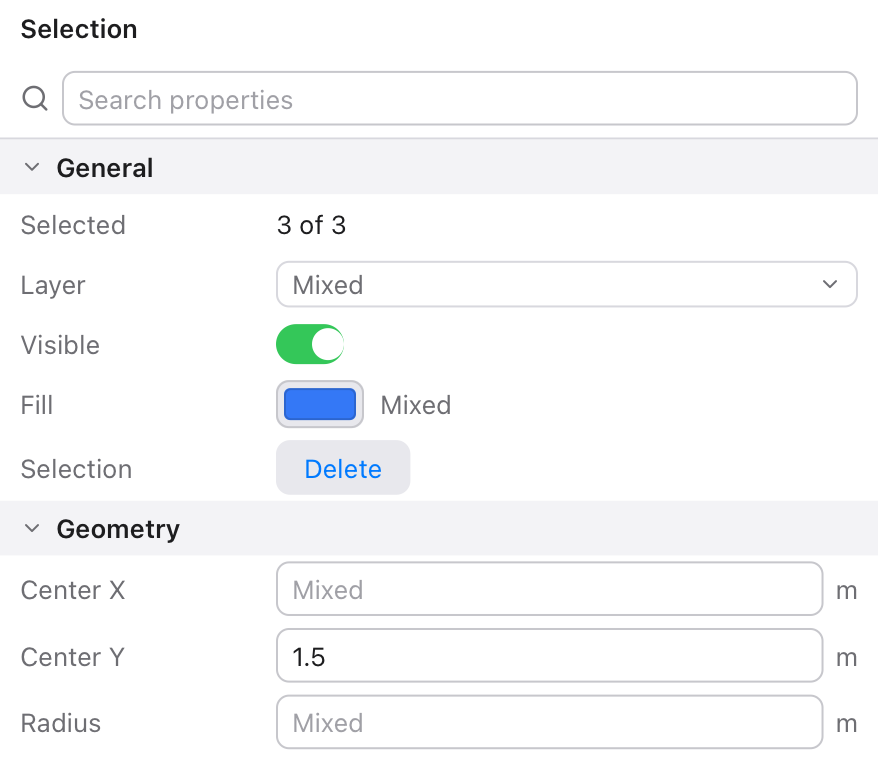
An Inspector for three selected shapes: Layer, Fill, Center X and Radius show Mixed

Mixed values for a selection

Build the rows from what's selected; where the things differ, the row says Mixed. A value typed or picked there comes back once, for you to give to all of them.

inspector.number("r", "Radius", first.radius, unit: "m",
                 group: "Geometry", mixed: !sameRadius)
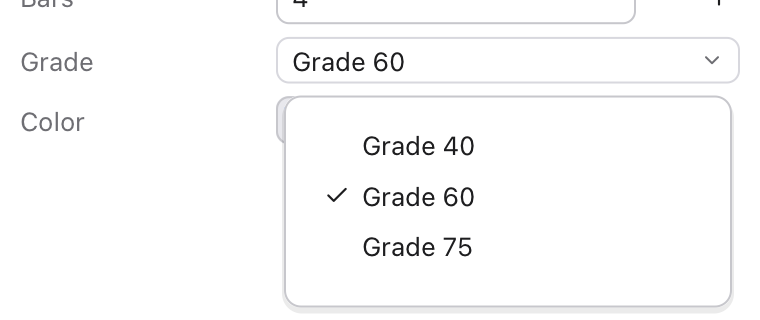
A Grade row with its list open: Grade 40, Grade 60 with a check mark, Grade 75

Choices, switches and colors

A list that opens under the row, a switch, Tessel's color palette, a text field, a value to read and a button: each in the same two columns.

inspector.ChoiceRow("Grade", selection: beam.grade,
                    options: ["Grade 40", "Grade 60", "Grade 75"])
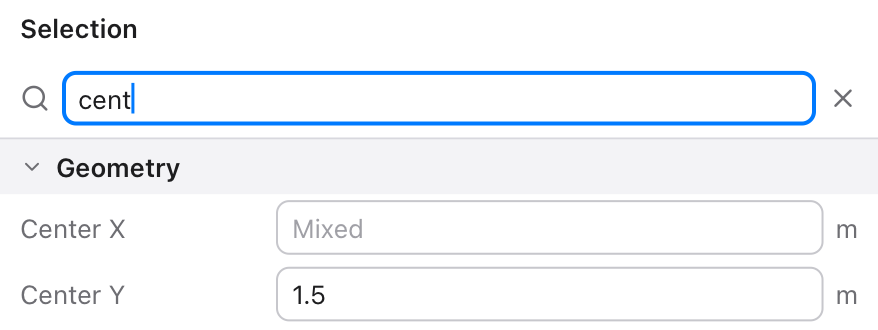
An Inspector searched for cent, showing only Center X and Center Y under Geometry

Sections and search

Groups open and close; a search box shows only the rows whose label (or group) has what's typed, and hides the groups with nothing left.

inspector.Inspector(properties: props, title: "Selection") { key, value in
    apply(key, value)
}

Two ways to make a panel

They look the same and can sit side by side, as in the picture at the top.

Rows bound to your values

For a panel that's always the same. Each row edits one value directly; onChange runs after it does.

import inspector

struct Beam {
    span: Float = 6000.0
    depth: Float = 450.0
    grade: String = "Grade 60"
    braced: Bool = true
}

app BeamPanel(width: 380, height: 220) {
    state beam = Beam()

    inspector.Section("Beam") {
        inspector.NumberRow("Span", value: beam.span, unit: "mm", decimals: 0, min: 0.0)
        inspector.NumberRow("Depth", value: beam.depth, unit: "mm", decimals: 0, step: 25.0)
        inspector.ChoiceRow("Grade", selection: beam.grade, options: ["Grade 40", "Grade 60", "Grade 75"])
        inspector.ToggleRow("Braced", isOn: beam.braced)
    }
}

An Inspector built from properties

For a panel that changes with what's selected. Every change comes back to one block, with the property's key and its new value.

inspector.Inspector(properties: [
    inspector.info("count", "Selected", "{picked.count} shapes", group: "General"),
    inspector.choice("layer", "Layer", first.layer, layers, group: "General", mixed: !sameLayer),
    inspector.number("r", "Radius", first.radius, unit: "m", min: 0.0, group: "Geometry", mixed: !sameRadius),
    inspector.action("delete", "Selection", "Delete", group: "General"),
]) { key, value in
    match value {
        .number(x) -> { for k in selected { if key == "r" { shapes[k].radius = x } } }
        .text(s) -> { for k in selected { if key == "layer" { shapes[k].layer = s } } }
        .pressed -> deleteSelected()
        _ -> {}
    }
}

Number fields

What's typed is applied when Enter is pressed. A plain number is in the field's own unit, also next to one with a unit.

TypedIn a field inGives
2*3.5 + 1anything8
3 ftmm914.4
5'6" or 5 ft 6 inin66
1 m + 50mm1050
100 psikPa689.48
12 kN/mN/mm12
68 °F°C20
sqrt(16 m²)m4
asin(0.5)deg30

min and max keep the value in bounds. Dragging a row's label sideways changes its value, and with a step, − and + buttons do too. Functions: sqrt abs round sin cos tan asin acos atan ln log exp and pi; sin, cos and tan take degrees, as in CAD programs.

Units

KindUnits
Lengthm km cm mm µm in ft yd mi nmi, and ' " for feet and inches
Area, volumeany length squared or cubed (m², ft^2, m³), ha acre L mL gal
Masskg g mg t lb oz slug
ForceN kN MN lbf kip kgf tf
Pressure, stressPa kPa MPa GPa bar atm psi ksi psf ksf mmHg
Energy, powerJ kJ MJ Wh kWh cal kcal BTU W kW MW hp
Flow, speedcfs gpm MGD mph knot kph, and combinations like m³/s, L/s, km/h
Time, angles ms min h day, rad deg ° rev
TemperatureK °C °F

Units combine with ·, *, / and powers: kN·m, kN/m², m^3/s. A field's unit that inspector doesn't know (blows/ft) is only shown, and the field takes plain numbers.

Tested without a window

Tessel runs any app headless, driven by a script of clicks and keys. The library's UI tests type, click, drag and search in the example app that way, and check every row afterwards.

34UI checks: units, bounds, mistakes, choices, colors, search, Mixed
100+number-field readings checked against values worked out in Python
85unit names across length, force, stress, flow and more
4files of Tessel, nothing else to install

Reference

Rows bound to your values

RowEdits
NumberRow(label, value:, unit:, decimals:, min:, max:, step:)A Float.
IntegerRow(label, value:, unit:, min:, max:, step:)An Int; what's typed is rounded.
TextRow(label, text:)A String, applied with Enter.
ToggleRow(label, isOn:)A Bool, with a switch.
ChoiceRow(label, selection:, options:)One of options, from a list that opens on a click.
ColorRow(label, color:)A Color, from Tessel's palette.
InfoRow(label, value)Nothing: shows a value.
ButtonRow(label, title) { … }Nothing: a button.
Section(title, expanded:) { … }A heading that opens and closes its rows.
SearchBox(text:)A search field; give its text to the rows' filter:.

Every row also takes readOnly:, labelWidth:, help: (shown when the mouse rests on the label), filter: and an onChange block.

Properties for an Inspector

PropertyComes back as
inspector.number(key, label, value, unit:, decimals:, min:, max:, step:).number(x)
inspector.integer(key, label, value, …).number(x), a whole number
inspector.text(key, label, value).text(s)
inspector.toggle(key, label, on).toggle(on)
inspector.choice(key, label, value, options).text(option)
inspector.color(key, label, color).color(c)
inspector.info(key, label, value)(read only)
inspector.action(key, label, title).pressed

Each also takes group:, readOnly:, mixed: and help:. Inspector(properties:, title:, search:, labelWidth:, emptyText:) { key, value in … } shows them. inspector.evaluate(text, unit:) reads a number as a field does, and inspector.formatNumber(x, decimals:) shows one as the rows do.